Wednesday, December 26, 2018

SSIS

Purpose

Setup a package to use Project parameter connections and deploy to Integrations Services Catalogs

Design

1. Open or Create a new solution

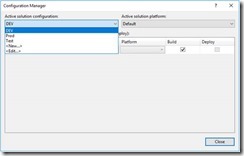
2. Setup the amount of environments in Configuration Manager

clip_image002

clip_image004

3. Open Package and Setup connections. In this case sql db. Right click on Connection Managers

clip_image006

4. Select New and select server and database.
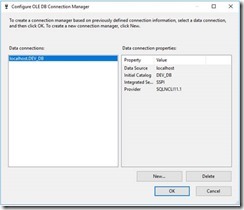
clip_image008

5. Rename connection to something more meaning full ie SQL_Source

clip_image009[4]

To

clip_image010[4]

6. Convert to a project connection.

clip_image012

Name will change from SQL_Source to (project)SQL_Source
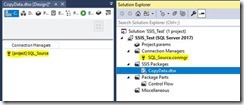
clip_image014

7. Parameterize Connection

clip_image016

7.1. Click Ok

clip_image018

double click Project.params to open

clip_image020

8. Add Parameter to Configuration

clip_image022

8.1 Click Add

clip_image024

Now you can adjust the connection strings for each environment

clip_image026

9. You can test that the connection string changes per environment by adjusting the solution configuration

clip_image028

clip_image029[4]

10. Repeat Steps 3-9 for destination connection

clip_image030[4]

clip_image031[4]

11. Lets setup a simple data flow task to test this.
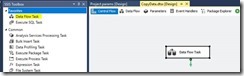
clip_image033

clip_image034

Deployment

1. Skip this step if Integration Services Catalogs has been setup. Setup Integration Services Catalogs.

clip_image035

2. Setup folders in Integration Services Catalogs

clip_image036

4. Deploy package/s for DEV.

clip_image038

Follow the wizard (Please note that a new deployment in project was created in Integration Services Catalogs).
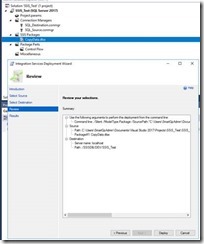
clip_image040

5. Repeat step 4 for test configuration

clip_image041

6. Check configuration

clip_image042

6.1. Dev Environment

clip_image044

6.2. Test Environment

clip_image046

7. Execute Dev package

clip_image047

clip_image048

Result

clip_image050

Friday, February 6, 2015

Presented @SQLSaturday #365 Melbourne

Did a presentation on MDS this morning, covering some basic MDS theory and then demoing the codeplex MDS administration tool on complex deployments.

Download Presentation

Monday, February 17, 2014

Populate varchar(max) or nvarchar(max) to SSIS string variable

How to import varchar(max) into SSIS string variable.

Database table

clip_image002

SSIS Varaibles
clip_image004

SSIS query result set object
clip_image006

The foreach loop has to have something in it otherwise the variables don’t get populated.

clip_image008

Execute SQL Task set up. There is only one record returned from the query. Make sure the the SQLStatement handles NULLs via ISNULL(xxx,'') or COALESCE(xxx,'')

clip_image010

clip_image012

Foreach loop setup.

clip_image014

clip_image016

Wednesday, November 28, 2012

MDS - Operation is not valid due to the current state of the objec


If you have a large model and you are trying edit security settings in MDS(Master Data Services) you may get the following error:

An unknown error occurred.

or
Operation is not valid due to the current state of the object

or
Description: An unhandled exception occurred during the execution of the current web request. Please review the stack trace for more information about the error and where it originated in the code.

Exception Details: System.InvalidOperationException: Operation is not valid due to the current state of the object.

Source Error: 
An unhandled exception was generated during the execution of the current web request. Information regarding the origin and location of the exception can be identified using the exception stack trace below.

Stack Trace: 
[InvalidOperationException: Operation is not valid due to the current state of the object.]
   System.Web.HttpValueCollection.FillFromEncodedBytes(Byte[] bytes, Encoding encoding) +11371791
   System.Web.HttpRequest.FillInFormCollection() +329

[HttpException (0x80004005): The URL-encoded form data is not valid.]
   System.Web.HttpRequest.FillInFormCollection() +11485906
   System.Web.HttpRequest.get_Form() +157
   System.Web.HttpRequest.get_HasForm() +11486708
   System.Web.UI.Page.GetCollectionBasedOnMethod(Boolean dontReturnNull) +141
   System.Web.UI.Page.DeterminePostBackMode() +100
   System.Web.UI.Page.ProcessRequestMain(Boolean includeStagesBeforeAsyncPoint, Boolean includeStagesAfterAsyncPoint) +259

Solution
Thanks to the MS MDS support team you need to add the following to the web.config file located C:\Program Files\Microsoft SQL Server\110\Master Data Services\WebApplication

<configuration>
<appSettings>
<add key="aspnet:MaxHttpCollectionKeys" value="2000" />
</appSettings>
</configuration>

appSettings is located near the end of the file. If the error is still occurring increase the value 10000

Wednesday, November 14, 2012

MDS Missing attribute


Tag
Master Data Services

I had an issue where the subscription view would show all the attributes but when trying to edit the entity in Explorer or System Administration the attribute would not appear.
So started looking at mdm.tblAttribute table and there it was. So then I looked in mdm.viw_SYSTEM_SCHEMA_ATTRIBUTES and it was missing


SELECT
*
FROM
mdm.tblModel tMod  
JOIN mdm.tblEntity tEnt ON tMod.ID = tEnt.Model_ID  
JOIN mdm.tblAttribute tAtt ON tEnt.ID = tAtt.Entity_ID  
JOIN  mdm.tblEntityMemberType tMemberType ON tAtt.MemberType_ID = tMemberType.ID
JOIN mdm.tblList tAttributeType ON tAttributeType.ListCode = N'lstAttributeType' AND tAtt.AttributeType_ID = tAttributeType.OptionID
JOIN mdm.tblList tDataType ON tDataType.ListCode = N'lstDataType' AND tAtt.DataType_ID = tDataType.OptionID
--JOIN mdm.tblUser usrE ON tAtt.EnterUserID = usrE.ID
--JOIN mdm.tblUser usrL ON tAtt.LastChgUserID = usrL.ID
LEFT OUTER JOIN mdm.tblList tDataMask ON tDataMask.ListCode = N'lstInputMask' AND tAtt.InputMask_ID = tDataMask.OptionID AND tAtt.DataType_ID = tDataMask.Group_ID
LEFT OUTER JOIN mdm.tblEntity tDBAEnt ON tAtt.DomainEntity_ID = tDBAEnt.ID

It turns out I had DELETED all the users from the mdm.tblUser table except for user ID 1. Problem is viw_SYSTEM_SCHEMA_ATTRIBUTES does an INNER JOIN with the tblUser table.

Run the following to check if there are any issues.


SELECT * FROM mdm.tblEntity WHERE
EnterUserID <> 1
OR LastChgUserID <> 1

SELECT * FROM mdm.tblAttribute WHERE
EnterUserID <> 1
OR LastChgUserID <> 1

UPDATE mdm.tblAttribute SET EnterUserID = 1, LastChgUserID = 1 WHERE EnterUserID <> 1 OR LastChgUserID <> 1


Thursday, October 11, 2012

MDS Master Data Services 2012 Rename Entity Staging Table


DECLARE @StagingTable NVARCHAR(100) = 'StagingTableOldName'
DECLARE @NewStagingTable NVARCHAR(100) = 'StagingTableNewName'
DECLARE @EntityID INT

DECLARE db_cursor CURSOR FOR
SELECT e.ID, e.StagingBase, @NewStagingTable
  FROM [mdm].[tblEntity] e
  INNER JOIN mdm.tblModel m ON e.Model_ID = m.ID
  WHERE m.Name = 'MTN'
  AND e.StagingBase = @StagingTable
OPEN db_cursor
FETCH NEXT FROM db_cursor INTO @EntityID, @StagingTable, @NewStagingTable
WHILE @@FETCH_STATUS = 0
BEGIN
PRINT '---- ' + @StagingTable
PRINT 'UPDATE mdm.tblEntity SET StagingBase = ' + QUOTENAME(@NewStagingTable, '''') + ' WHERE ID = ' + CAST(@EntityID AS NVARCHAR(10))
PRINT 'DROP PROC stg.udp_' + @StagingTable + '_Leaf'
PRINT 'DROP VIEW stg.viw_' + @StagingTable + '_MemberErrorDetails'
 
PRINT 'EXEC sp_rename ' + QUOTENAME('stg.' + @StagingTable + '_Leaf', '''') + ', ' + QUOTENAME(@NewStagingTable + '_Leaf', '''')
PRINT 'EXEC sp_rename ' + QUOTENAME('stg.' + @NewStagingTable + '_Leaf.pk_' + @StagingTable+ '_Leaf', '''') + ', ' + QUOTENAME('pk_' + @NewStagingTable + '_Leaf', '''')
PRINT 'EXEC sp_rename ' + QUOTENAME('stg.ck_' + @StagingTable + '_Leaf_ImportType', '''') + ', ' + QUOTENAME('ck_' + @NewStagingTable + '_Leaf_ImportType', '''')
PRINT 'EXEC sp_rename ' + QUOTENAME('stg.ck_' + @StagingTable + '_Leaf_ImportStatus_ID', '''') + ', ' + QUOTENAME('ck_' + @NewStagingTable + '_Leaf_ImportStatus_ID', '''')
PRINT 'EXEC sp_rename ' + QUOTENAME('stg.' + @NewStagingTable + '_Leaf.ix_' + @StagingTable + '_Leaf_Batch_ID', '''') + ', ' + QUOTENAME('ix_' + @NewStagingTable + '_Leaf_Batch_ID', '''')
PRINT 'EXEC sp_rename ' + QUOTENAME('stg.' + @NewStagingTable + '_Leaf.ix_' + @StagingTable + '_Leaf_BatchTag', '''') + ', ' + QUOTENAME('ix_' + @NewStagingTable + '_Leaf_BatchTag', '''')

PRINT 'EXEC sp_rename ' + QUOTENAME('stg.df_' + @StagingTable + '_Leaf_ImportStatus_ID', '''') + ', ' + QUOTENAME('df_' + @NewStagingTable + '_Leaf_ImportStatus_ID', '''')
PRINT 'EXEC mdm.udpEntityStagingCreateLeafStoredProcedure ' + CAST(@EntityID AS NVARCHAR(10))
PRINT 'EXEC mdm.udpCreateEntityStagingErrorDetailViews ' + CAST(@EntityID AS NVARCHAR(10))
PRINT ''
FETCH NEXT FROM db_cursor INTO @EntityID, @StagingTable, @NewStagingTable
END
CLOSE db_cursor
DEALLOCATE db_cursor

Thursday, August 9, 2012

MDS Checking Users Security Settings

Hi,

Here are some sql scripts that you can run to check the security settings of a user in MDS (Master Data Services).

-------------------------------------------------------------------------------      
-- Model User Security
-------------------------------------------------------------------------------
SELECT * FROM mdm.udfSecurityUserModelList(5) ACL
INNER JOIN mdm.viw_SYSTEM_SCHEMA_MODEL vModel ON ACL.ID = vModel.ID
INNER JOIN mdm.tblSecurityPrivilege tPriv ON tPriv.ID = acl.Privilege_ID
-------------------------------------------------------------------------------      
-- Entity User Security
-------------------------------------------------------------------------------
SELECT vEnt.Model_ID,vEnt.Model_Name,
acl.ID AS 'Entity_ID', vEnt.Name AS 'Entity_Name', tPriv.Code
FROM    mdm.udfSecurityUserEntityList(5, NULL) acl
INNER JOIN mdm.viw_SYSTEM_SCHEMA_ENTITY vEnt ON  acl.ID = vEnt.ID 
INNER JOIN mdm.tblSecurityPrivilege tPriv ON tPriv.ID = acl.Privilege_ID
ORDER BY vEnt.Model_ID, vEnt.Name
-------------------------------------------------------------------------------      
-- Attribute Group User Security
-------------------------------------------------------------------------------
SELECT * 
FROM    mdm.udfSecurityUserAttributeGroupList(5, 4,149,1) acl
INNER JOIN mdm.viw_SYSTEM_SCHEMA_ATTRIBUTEGROUPS vAG ON  acl.ID = vAG.ID 
INNER JOIN mdm.tblSecurityPrivilege tPriv ON tPriv.ID = acl.Privilege_ID
ORDER BY vAG.Model_ID, vAG.Name
-------------------------------------------------------------------------------      
-- Attribute Group Attribute List User Security
-------------------------------------------------------------------------------
SELECT acl.USER_ID, acl.Model_ID, vAG.Model_Name, acl.Entity_ID,
vAG.Entity_Name, acl.Privilege_ID, tPriv.Code AS 'SecurityAttributeGroup_Code',
vAG.ID AS 'AttributeGroup_ID', vAG.Name AS 'AttributeGroup_Name',
vAGA.Attribute_ID,vAGA.Attribute_Name, tPrivA.Code AS 'SecurityAttribute_Code'
FROM mdm.udfSecurityUserAttributeGroupList(1, 4,149,1) acl
INNER JOIN mdm.tblSecurityPrivilege tPriv ON tPriv.ID = acl.Privilege_ID
INNER JOIN mdm.viw_SYSTEM_SCHEMA_ATTRIBUTEGROUPS vAG ON  acl.ID = vAG.ID 
INNER JOIN  mdm.viw_SYSTEM_SCHEMA_ATTRIBUTEGROUPS_ATTRIBUTES vAGA ON vAG.ID = vAGA.AttributeGroup_ID
INNER JOIN mdm.udfSecurityUserAttributeList(1, 4,149,1) acla ON acla.ID = vAGA.Attribute_ID
INNER JOIN mdm.tblSecurityPrivilege tPrivA ON tPrivA.ID = acla.Privilege_ID
ORDER BY vAG.Model_ID, vAG.Name

-------------------------------------------------------------------------------      
-- Attribute List User Security
-------------------------------------------------------------------------------
SELECT va.Model_ID, va.Model_Name, va.Entity_ID, va.Entity_Name,
va.Attribute_ID, va.Attribute_Name, tPrivA.Code AS 'Security_Code'
FROM mdm.udfSecurityUserAttributeList(5, 4,149,1) acla
INNER JOIN mdm.viw_SYSTEM_SCHEMA_ATTRIBUTES vA ON acla.ID = vA.Attribute_ID
INNER JOIN mdm.tblSecurityPrivilege tPrivA ON tPrivA.ID = acla.Privilege_ID
ORDER BY vA.Model_ID, vA.Entity_Name, vA.Attribute_Name